Custom Search
Showing posts with label Communications. Show all posts

Sunday, April 1, 2012

What is a Satellite?


What is a Satellite
What is a Satellite
In the context of spaceflight, a satellite is an object which has been placed into orbit by human endeavour. Such objects are sometimes called artificial satellites to distinguish them from natural satellites such as the Moon.

The world's first artificial satellite, the Sputnik 1, was launched by the Soviet Union in 1957. Since then, thousands of satellites have been launched into orbit around the Earth; also some satellites, notably space stations, have been launched in parts and assembled in orbit. Artificial satellites originate from more than 50 countries and have used the satellite launching capabilities of ten nations. A few hundred satellites are currently operational, whereas thousands of unused satellites and satellite fragments orbit the Earth as space debris. A few space probes have been placed into orbit around other bodies and become artificial satellites to the Moon, Mercury, Venus, Mars, Jupiter, Saturn, and the Sun.


Satellites are used for a large number of purposes. Common types include military and civilian Earth observation satellites, communications satellites, navigation satellites, weather satellites, and research satellites. Space stations and human spacecraft in orbit are also satellites. Satellite orbits vary greatly, depending on the purpose of the satellite, and are classified in a number of ways. Well-known (overlapping) classes include low Earth orbit, polar orbit, and geostationary orbit.

Satellites are usually semi-independent computer-controlled systems. Satellite subsystems attend many tasks, such as power generation, thermal control, telemetry, attitude control and orbit control.

    Satellites Applications                       

Not so long ago, satellites were exotic, top-secret devices. They were used primarily in a military capacity, for activities such as navigation and espionage. Now they are an essential part of our daily lives. We see and recognize their use in weather reports, television transmission by DIRECTV and the DISH Network, and everyday telephone calls. In many other instances, satellites play a background role that escapes our notice:


  •     Some newspapers and magazines are more timely because they transmit their text and images to multiple printing sites via satellite to speed local distribution.
  •     Before sending signals down the wire into our houses, cable television depends on satellites to distribute its transmissions.
  •     The most reliable taxi and limousine drivers are sometimes using the satellite-based Global Positioning System (GPS) to take us to the proper destination.
  •     The goods we buy often reach distributors and retailers more efficiently and safely because trucking firms track the progress of their vehicles with the same GPS. Sometimes firms will even tell their drivers that they are driving too fast.
  •     Emergency radio beacons from downed aircraft and distressed ships may reach search-and-rescue teams when satellites relay the signal.

References:
                       Wikipedia
                        How Stuff Works


" What is a Satellite? " !

Thursday, March 8, 2012

FM Demodulation


    THE PHASE LOCKED LOOP (PLL)  
     
In the last section, the PLL was mentioned as a way to demodulate an FM signal. In addition to FM demodulation, PLLs are used in a wide variety of communications applications, which include TV receivers, tone decoders, telemetry receivers, modems and data synchronizers, to name a few. Many of these applications are covered in electronic communications courses. In fact, entire books have been written on the finer points of PLL operation, analysis, and applications. The approach in this section is intended only to present the basic concept and give you an intuitive idea of how PLLs work and how they are used in FM demodulation. A specific PLL integrated circuit is also introduced.


    The Basic PLL Concept                     
    

The phase locked loop (PLL) is a feedback circuit consisting of a phase detector, a low-pas filter, and a voltage-controlled oscillator (VCO) Some PLLs also includes an amplifier in the loop. A basic block diagram is shown in figure 5.16.


FM Demodulation_Basic PLL block diagram
Basic PLL block diagram
The general operation of a PLL is as follows. The phase detector compares the phase difference between the incoming signal, Vi, and the VCO signal, Vo.

When the frequency of the incoming signal, fi, is the difference from that of the VCO frequency, fo, the phase angle between the two signals is also different. The output of the phase detector and the filter is proportional to the phase difference of the two signals. This proportional voltage is fed to the VCO, forcing its frequency to move toward the frequency of the incoming signal until the two frequencies are equal. At this point, the PLL is locked onto the incoming frequency. If fi change, the phase difference also changes, forcing the VCO to track the incoming frequency.
===================================
References

 
" FM Demodulation " !

Sunday, February 19, 2012

Mobile Tracking using the Cell ID


Cell ID location tracking system is a great way to know where someone is within an accuracy of about 1km but it is not a substitute for GPS tracking systems. The Cell ID system is only accurate enough to answer the question "Which part of town are you in" and not " Which street are you in". For the majority of users this is sufficient to prove if someone was lying about their location.  

Mobile Tracking using the Cell ID


    What is Cell ID?     

A GSM Cell ID (CID) is a generally unique number used to identify each Base transceiver station (BTS) or sector of a BTS within a Location area code (LAC) if not within a GSM network.

    How Cell ID technique works?      

A network provider has several hundred radio base stations ( cells) that make up its network. Each base station is a "cell" which covers a physical area and these cells connect together to make up the entire network. The size of cells depends on the density of base station installed in a given area. Cell sizes can vary from 100m in cities to 3K in rural areas .A mobile phone connects to the network using the cell in which it is located.. As the mobile moves, it leaves one cell and joins another. The new cell then takes responsibility for connecting the phone to the network.
Every time the cell that "owns" the mobile changes, you can get the cell id and cell name ( if available) . You can tell which cell controls the mobile by the name or by resolving the cell id against a database of cell id to locations.

Cell ID location tracking is based on information that is freely available from the airwaves, and the location information is the form of a CELL ID, and the name of the CELL. The name of the cell is usually the name of a part of town, and so this is good enough to know where someone is. 

Source:       
               FlexiSPY
               Wikipedia   
               GSM Modem


" Mobile Tracking using the Cell ID " !

Monday, January 23, 2012

Stop paying PER Device for Wi-Fi access!


    It's Easy as 1,2,3!
Access Internet by your Cell Phone through WiFi


1: Set your desired Hotspot name and password.

2: Select which Internet connection you'd like to share.

3:Click Start Hotspot.


    Stop paying PER Device for Wi-Fi access!


If you have to pay for Wi-Fi, at least make it work for you!
Create a Connectify hotspot and get all your devices online simultaneously without paying outrageous fees.


     Weak Wi-Fi Signal or Wired Only?        

With Connectify you can wirelessly share the Internet connection in your room with your phone, tablet, gaming system, and other equally important study tools.

Connectify Download 

" Stop paying PER Device for Wi-Fi access! " !

Tuesday, January 3, 2012

Code Division Multiple Access (CDMA)


    CDMA         

Short for Code-Division Multiple Access, a digital cellular technology that uses spread-spectrum techniques. Unlike competing systems, such as GSM, that use TDMA, CDMA does not assign a specific frequency to each user. Instead, every channel uses the full available spectrum. Individual conversations are encoded with a pseudo-random digital sequence. CDMA consistently provides better capacity for voice and data communications than other commercial mobile technologies, allowing more subscribers to connect at any given time, and it is the common platform on which 3G technologies are built.


Code Division Multiple Access (CDMA)

CDMA users share a common frequency channel. All users are on the same frequency at the same time. However, each pair of users is assigned a special code that reduces interference while increasing privacy.

    Advantages of CDMA

Most efficient use of available bandwidth the foremost advantage is the large band width and its equivalent effect utilization for sending and receiving the data.

No separate time Access divisions
In CDMA technology there is no time limitation slot division for using the band width and sending and receiving the data like in TDMA.

Power and bandwidth frequency
Power frequency remains constant in both sending and receiving and uniform bandwidth keeps the transmission faster and in time.

Resource allocation
Another advantage of CDMA is the flexible resource allocation which means that a certain kind of pin code is provide to the active users to communicate with each other. Fixed time and bandwidth keeps the simultaneous exchange of message at both sender and receivers end and specific number of packets with limited length keeps the extra traffic out of the channel.

    Disadvantages of CDMA     

The main disadvantage of CDMA is that it can’t be used for the multi channel or multiple transmission paths. All the communication is performed over a single path. This make it fixed for singular purposes which is main drawback of CDMA technology.

    Space Division Multiple Access (SDMA)  

Space Division Multiple Access (SDMA) - A variation of TDMA and CDMA that potentially will be used in high-bandwidth, third-generation wireless products.

SDMA is a channel access method based on creating parallel spatial pipes next to higher capacity pipes through spatial multiplexing and/or diversity, by which it is able to offer superior performance in radio multiple access communication systems. In traditional mobile cellular network systems, the base station has no information on the position of the mobile units within the cell and radiates the signal in all directions within the cell in order to provide radio coverage. This results in wasting power on transmissions when there are no mobile units to reach, in addition to causing interference for adjacent cells using the same frequency, so called co-channel cells. Likewise, in reception, the antenna receives signals coming from all directions including noise and interference signals. By using smart antenna technology and differing spatial locations of mobile units within the cell, space-division multiple access techniques offer attractive performance enhancements. The radiation pattern of the base station, both in transmission and reception, is adapted to each user to obtain highest gain in the direction of that user. This is often done using phased array techniques.

     Comparison of Multiple Access Systems

 
Comparison of Multiple Access Systems_CDMA_FDMA_TDMA
Comparison of Multiple Access Systems

This table summarizes some of the technical aspects of the multiple access technologies.

The technology used determines the channel's capacity. TDMA triples the capacity of FDMA, but CDMA capacity can be up to seven times that of TDMA.

References:
                   WiFi Notes
                   Wikipedia
                   CDMA University
                   WEBOPEDIA
                   How Stuff Works


" Code Division Multiple Access (CDMA) " !

Saturday, December 10, 2011

Frequency Division Multiple Access (FDMA)


    FDMA                           
Multiple Access Systems-Frequency Division Multiple Access (FDMA)
Frequency Division Multiple Access (FDMA)

Frequency Division Multiple Access or FDMA is a channel access method used in multiple-access protocols as a channelization protocol. FDMA gives users an individual allocation of one or several frequency bands, or channels. It is particularly commonplace in satellite communication. FDMA, like other Multiple Access systems, coordinates access between multiple users.

Each FDMA subscriber is assigned a specific frequency channel. No one else in the same cell or a neighboring cell can use the frequency channel while it is assigned to a user. This reduces interference, but severely limits the number of users.

    Advantage of FDMA                         
 
* FDMA technique doesn't need any base-control station.
* Data that transfeered between each station to another during the transmission process will not be lost.
* After the transmission of data,the effect ot the delay distortion will be so small and it can be ignored.
* There is no need for network timing.
* The channel operations in FDMA are simple.
* In FDMA,the reduction of the information bit rate has a good effect on the capacity.
* No need for any equalization.
* Because of the transmission is continuous,there is almost no need for bits that are responsible for synchronization.
* Simplicity in FDMA algorithms.

    Disadvantages of FDMA                   


* In the FDMA technique,it is impossible for the stations to receive data from more than one transmission source.
* One of most important thing in communication systems is the maximum data rate which is small and fixed for every channel in FDMA.
* Because of the guard bands,the capacity of the FDMA will be decreased.
* Increasing the cost of FDMA,since the band filters are narrow that can't be recognized by VLSI.
* FDMA requires special filters to avoid any interference between the narrow channels.


    TDMA                        
    CDMA                       
    SDMA                        

Reference:

    * Wikipedia
    * CDMA University
    * WEBOPEDIA
    * How Stuff Works   


" Frequency Division Multiple Access (FDMA) " !

Friday, December 9, 2011

Multiple Access Systems


    Why Multiple Access?  
 

Multiple Access systems coordinates access between multiple users.Wireless telecommunications has dramatically increased in popularity, resulting in the need for technologies that allow multiple users to share the same Bandwidth.
The following Multiple Access Systems have very different approaches to the bandwidth problem. 


Multiple Access Systems-Time Division Multiple Access (TDMA)
Time Division Multiple Access (TDMA)

     TDMA                       

Short for Time Division Multiple Access, a technology for delivering digital wireless service using time-division multiplexing (TDM). TDMA works by dividing a radio frequency into time slots and then allocating slots to multiple calls. In this way, a single frequency can support multiple, simultaneous data channels.
The users transmit in rapid succession, one after the other, each using its own time slot. This allows multiple stations to share the same transmission medium (e.g. radio frequency channel) while using only a part of its channel capacity. TDMA is used in the digital 2G cellular systems such as Global System for Mobile Communications (GSM), IS-136, Personal Digital Cellular (PDC) and iDEN, and in the Digital Enhanced Cordless Telecommunications (DECT) standard for portable phones. It is also used extensively in satellite systems, combat-net radio systems, and PON networks for upstream traffic from premises to the operator.
TDMA is a type of Time-division multiplexing, with the special point that instead of having one transmitter connected to one receiver, there are multiple transmitters. In the case of the uplink from a mobile phone to a base station this becomes particularly difficult because the mobile phone can move around and vary the timing advance required to make its transmission match the gap in transmission from its peers.
 

    Advantages of TDMA                       

The radio part of the mobile only needs to listen and broadcast for its own time slot. For the rest of the time, the mobile can carry out measurements on the network, detecting surrounding transmitters on different frequencies. This allows safe inter frequency handovers, something which is difficult in CDMA systems, not supported at all in IS-95 and supported through complex system additions in Universal Mobile Telecommunications System (UMTS). This in turn allows for co-existence of microcell layers with macrocell layers.


    Disadvantages of TDMA                 

TDMA systems create interference at a frequency which is directly connected to the time slot length. This is the buzz which can sometimes be heard if a TDMA phone is left next to a radio or speakers.Another disadvantage is that the "dead time" between time slots limits the potential bandwidth of a TDMA channel. These are implemented in part because of the difficulty in ensuring that different terminals transmit at exactly the times required. Handsets that are moving will need to constantly adjust their timings to ensure their transmission is received at precisely the right time, because as they move further from the base station, their signal will take longer to arrive. This also means that the major TDMA systems have hard limits on cell sizes in terms of range, though in practice the power levels required to receive and transmit over distances greater than the supported range would be mostly impractical anyway.


    FDMA                        
    CDMA                       
    SDMA                        

Reference:
    
    * Wikipedia 
    * CDMA University
    * WEBOPEDIA
    * How Stuff Works


" Multiple Access Systems " !

Friday, November 18, 2011

Cell Phone Network Coverage


Network coverage

A key part of any mobile phone specification is its operating frequency bands. The supported frequency bands determine
whether a certain handset is compatible with a certain network carrier.


Cell Phone Network Coverage,GSM,2G,3G
Cell Phone Network Coverage
Beside the mobile phone specifications, GSM Arena is happy to also provide you with its own country-based frequency band directory. It's not operator-specific and it's helpful if you are choosing a handset to use in your home country or if you are making sure your phone will work in the country you are heading to.
You select the country you are interested in - as an example i selected Egypt - :

EGYPT

GSM 850     GSM 900     GSM 1800     GSM 1900     UMTS 850     UMTS 1900     UMTS 2100
  No               Yes               Yes                 No                  No                   No                    Yes   


Making calls, sending text messages and using GPRS/EDGE mobile data connection in the country of your choice requires a mobile phone that supports at least the frequency band filled as “Required” below.

2G capabilities

Required   GSM 900
Recommended   GSM 900 and GSM 1800

Making video calls and using a high-speed 3G data connection in the country of your choice, requires a mobile phone that supports at least the frequency band filled as “Required” below .

3G capabilities

Required   UMTS 2100


Make note that for complete accuracy you should always check with your home service provider or with the local service providers in the country you are staying at.

Check Network Coverage for your Country GSM Arena - Network Bands

Source:
                  * GSM Arena


" Cell Phone Network Coverage " !

Saturday, November 12, 2011

GSM Architecture and Definitions (3)


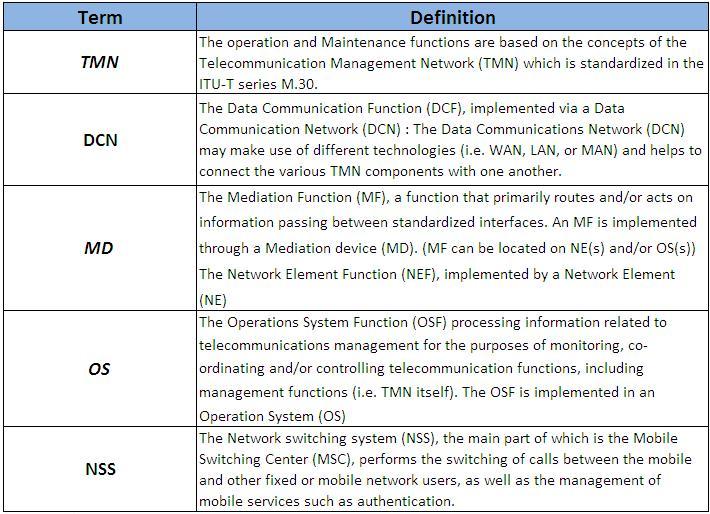
    The Operation and Support System 

The operations and maintenance center (OMC) is connected to all equipment in the switching system and to the BSC. The implementation of OMC is called the operation and support system (OSS). The OSS is the functional entity from which the network operator monitors and controls the system. The purpose of OSS is to offer the customer cost-effective support for centralized, regional, and local operational and maintenance activities that are required for a GSM network. An important function of OSS is to provide a network overview and support the maintenance activities of different operation and maintenance organizations.


GSM Operation and Support System (OSS)
OSS: The operations and maintenance center (OMC) is connected to all equipment in the switching system and to the BSC. The implementation of OMC is called the operation and support system (OSS).
       Here are some of the OMC functions:
       * Administration and commercial operation (subscription, end terminals, charging and statistics).
       * Security Management.
       * Network configuration, Operation and Performance Management.

       * Maintenance Tasks.    

GSM Architecture and Definitions


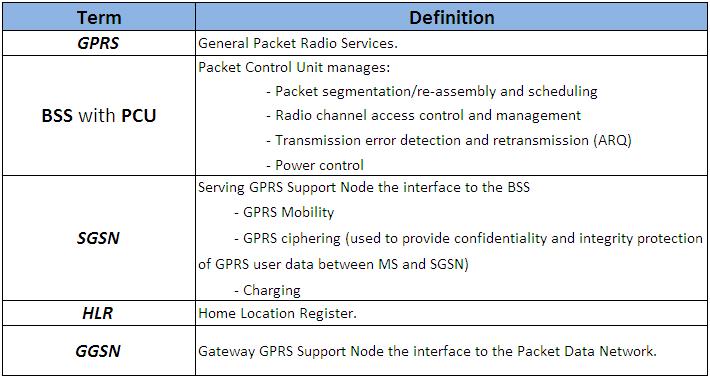
GPRS (General Packet Radio Services
GPRS (General Packet Radio Services)

    
GPRS General Packet Radio Services

GPRS is a data network that overlays a second-generation GSM network. This data overlay network provides packet data transport at rates from 9.6 to 171 kbps. Additionally, multiple users can share the same air-interface resources simultaneously.

GPRS attempts to reuse the existing GSM network elements as much as possible, but to effectively build a packet-based mobile cellular network, some new network elements, interfaces, and protocols for handling packet traffic are required.


GSM Architecture and Definitions


External Networks
  PSTN: Public Switched Telephone Network
  ISDN: Integrated Services Digital Network
  PDN: Packet Data Network

Refferance:
   * Alcatel-Lucent
   * Private Line
   * Tutorials Point 
  * SS7 Training


" GSM Architecture and Definitions (3) " !

GSM Architecture and Definitions (2)


    The Network Switching System  
 

The Network switching system (NSS) is responsible for performing call processing and subscriber-related functions. The switching system includes the following functional units.


GSM Architecture and Definitions
MSC: Mobile Switching Center a switching exchange whose main functions are:
       – Call Handling
       – Specific GSM functions such as:
         • Mobility Management: Communication with the Location Databases (VLR
           and HLR)
         • Handover execution when involved
       – Gateway Function for Terminating Call (TC)
    VLR: Visitor Location Register is associated with one or more MSC. It is a local database with the following
         information:
         – Copy of the HLR data for visiting subscribers
         – More precise location of the Mobile Station (an area of the network called
           “Location Area” which is a group of cells

         – Call re-direction data


GSM Architecture and Definitions

                                                                                                                                                      Next  

Refferance:    
                   * Alcatel-Lucent    
                   * Private Line    
                   * Tutorials Point    
                   * SS7 Training


" GSM Architecture and Definitions (2) " !

GSM Architecture and Definitions (1)


    What is GSM?           

GSM, which stands for Global System for Mobile communications, reigns as the world’s most widely used cell phone technology. Cell phones use a cell phone service carrier’s GSM network by searching for cell phone towers in the nearby area.

The origins of GSM can be traced back to 1982 when the Groupe Spécial Mobile (GSM) was created by the European Conference of Postal and Telecommunications Administrations (CEPT) for the purpose of designing a pan-European mobile technology.


It is approximated that 80 percent of the world uses GSM
GSM Architecture and Definitions
technology when placing wireless calls, according to the GSM
Association (GSMA), which represents the interests of the worldwide mobile communications industry. This amounts to nearly 3 billion global people.

    GSM Network Structure   

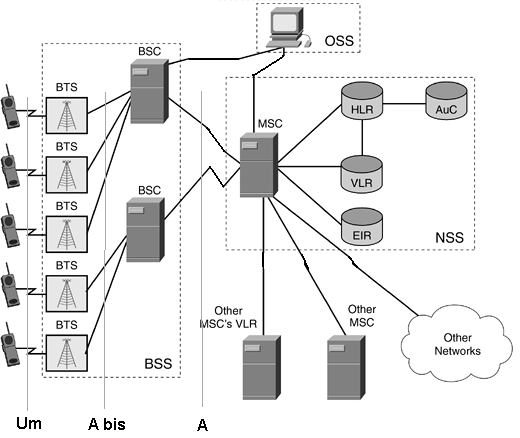
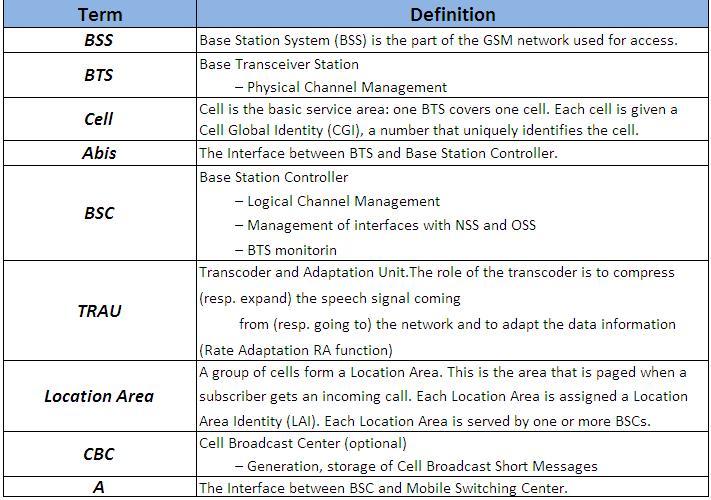
The network is structured into a number of discrete sections:

   *  The Base Station Subsystem (the base stations and their controllers).
   *  The Network and Switching Subsystem (the part of the network most similar to a fixed network). This is sometimes also just called the core network.
   * The GPRS Core Network (the optional part which allows packet based Internet connections).
   *  The Operations support system (OSS) for maintenance of the network.
 

Now,We will explain the meaning of the GSM Network shortcuts.

PLMN: Public Land Mobile Network is area covered by one network operator. A PLMN can contain one or more MSCs.
GSM: Global System for Mobile communication
  MS: Mobile Station is used by the subscriber for calling another subscriber either in the fixed network or in the mobile network.A Mobile Station (MS) is composed of a Mobile Termination (MT) and a Subscriber Module Identity (SIM) card.
   MT: Mobile Termination.The MT performs the following functions:
       - radio transmission termination;
       - radio transmission channel management;
       - terminal capabilities, including presentation of a  man-machine interface to a user;
       - speech encoding/decoding;
       - error protection for all information sent across the radio path;
       - flow control of signalling and user data;
       - rate adaptation of user data between the radio channel rate and user rates;
       - multiple terminal support;
       - mobility management.

SIM: SIM card stores information concerning the subscriber such as subscriber identity,services subscribed, parameters for security procedures and information on the location of the subscriber (dynamically refreshed according to its movements).
  Um > The Radio Interface between MS and Base Station.
     UpLink: The Path of the Data from MS to Base Station.
     DownLink: The Path of the Data from Base Station to MS.


GSM Architecture and Definitions


GSM Architecture and Definitions

                                                                                                   Next
Refferance:
   * Alcatel-Lucent
   * Private Line
   * Tutorials Point 
  * SS7 Training


" GSM Architecture and Definitions (1) " !

Wednesday, October 19, 2011

Optical Fiber Communication


An optical fiber is a flexible, transparent fiber made of very pure glass (silica) not much wider than a human hair that acts as a waveguide, or "light pipe", to transmit light between the two ends of the fiber.The field of applied science and engineering concerned with the design and application of optical fibers is known as fiber optics.

Optical fibers are widely used in fiber-optic communications, which
Optical Fiber Communication
permits transmission over longer distances and at higher bandwidths (data rates) than other forms of communication. Fibers are used instead of metal wires because signals travel along them with less loss and are also immune to electromagnetic interference. Fibers are also used for illumination, and are wrapped in bundles so they can be used to carry images, thus allowing viewing in tight spaces. Specially designed fibers are used for a variety of other applications, including sensors and fiber lasers.

    Optical Fiber Communication       

Optical fiber can be used as a medium for telecommunication and networking because it is flexible and can be bundled as cables. It is especially advantageous for long-distance communications, because light propagates through the fiber with little attenuation compared to electrical cables. This allows long distances to be spanned with few repeaters. Additionally, the per-channel light signals propagating in the fiber have been modulated at rates as high as 111 gigabits per second by NTT,although 10 or 40 Gbit/s is typical in deployed systems.

Each fiber can carry many independent channels, each using a different wavelength of light (wavelength-division multiplexing (WDM)). The net data rate (data rate without overhead bytes) per fiber is the per-channel data rate reduced by the FEC overhead, multiplied by the number of channels (usually up to eighty in commercial dense WDM systems as of 2008[update]).

The current laboratory fiber optic data rate record, held by Bell Labs in Villarceaux, France, is multiplexing 155 channels, each carrying 100 Gbit/s over a 7000 km fiber. Nippon Telegraph and Telephone Corporation have also managed 69.1 Tbit/s over a single 240 km fiber (multiplexing 432 channels, equating to 171 Gbit/s per channel).Bell Labs also broke a 100 Petabit per second kilometer barrier (15.5 Tbit/s over a single 7000 km fiber).

For short distance applications, such as a network in an office building, fiber-optic cabling can save space in cable ducts. This is because a single fiber can carry much more data than electrical cables such as standard category 5 Ethernet cabling, which typically runs at 1 Gbit/s. Fiber is also immune to electrical interference; there is no cross-talk between signals in different cables, and no pickup of environmental noise.

Non-armored fiber cables do not conduct electricity, which makes fiber a good solution for protecting communications equipment in high voltage environments, such as power generation facilities, or metal communication structures prone to lightning strikes. They can also be used in environments where explosive fumes are present, without danger of ignition. Wiretapping (in this case, fiber tapping) is more difficult compared to electrical connections, and there are concentric dual core fibers that are said to be tap-proof.

    Real Project                                         


   References:
                    * Wikipedia  
                    * Youtube (Make Magazine Channel) 

" Optical Fiber Communication " !

Monday, July 18, 2011

Cell Phones (2)

Cell-phone Frequencies

In the dark ages before cell phones, people who really needed mobile-communications ability installed radio telephones in their cars. In the radio-telephone system, there was one central antenna tower per city, and perhaps 25 channels available on that tower. This central antenna meant that the phone in your car needed a powerful transmitter -- big enough to transmit 40 or 50 miles (about 70 km). It also meant that not many people could use radio telephones -- there just were not enough channels.
The genius of the cellular system is the division of a city into small cells. This allows extensive frequency reuse across a city, so that millions of people can use cell phones simultaneously.
A good way to understand the sophistication of a cell phone is to compare it to a CB radio or a walkie-talkie.


  • Full-duplex vs. half-duplex - Both walkie-talkies and CB radios are half-duplex devices. That is, two people communicating on a CB radio use the same frequency, so only one person can talk at a time. A cell phone is a full-duplex device. That means that you use one frequency for talking and a second, separate frequency for listening. Both people on the call can talk at once.
  • Channels - A walkie-talkie typically has one channel, and a CB radio has 40 channels. A typical cell phone can communicate on 1,664 channels or more!
  • Range - A walkie-talkie can transmit about 1 mile (1.6 km) using a 0.25-watt transmitter. A CB radio, because it has much higher power, can transmit about 5 miles (8 km) using a 5-watt transmitter. Cell phones operate within cells, and they can switch cells as they move around. Cells give cell phones incredible range. Someone using a cell phone can drive hundreds of miles and maintain a conversation the entire time because of the cellular approach.

In half-duplex radio, both transmitters use the same frequency. Only one party can talk at a time.


In full-duplex radio, the two transmitters use different frequencies, so both parties can talk at the same time.
Cell phones are full-duplex.


In a typical analog cell-phone system in the United States, the cell-phone carrier receives about 800 frequencies to use across the city. The carrier chops up the city into cells. Each cell is typically sized at about 10 square miles (26 square kilometers). Cells are normally thought of as hexagons on a big hexagonal grid, like this:

Because cell phones and base stations use low-power transmitters, the same frequencies can be reused in non-adjacent cells. The two purple cells can reuse the same frequencies.


Each cell has a base station that consists of a tower and a small building containing the radio equipment. We'll get into base stations later. First, let's examine the "cells" that make up a cellular system.


Source: How Stuff Works


" Cell Phones (2) " !

Saturday, July 2, 2011

Demodulation


Demodulation

Demodulation is the act of extracting the original information-bearing signal from a modulated carrier wave. A demodulator is an electronic circuit (or computer program in a software defined radio) that is used to recover the information content from the modulated carrier wave.
These terms are traditionally used in connection with radio receivers, but many other systems use many kinds of demodulators. Another common one is in a modem, which is a contraction of the terms modulator/demodulator.
There are several ways of demodulation depending on how parameters of the base-band signal are transmitted in the carrier signal, such as amplitude, frequency or phase. For example, for a signal modulated with a linear modulation, like AM (Amplitude Modulated), we can use a synchronous detector. On the other hand, for a signal modulated with an angular modulation, we must use an FM (Frequency Modulation) demodulator or a PM (Phase Modulation) demodulator. Different kinds of circuits perform these functions.
Many techniques—such as carrier recovery, clock recovery, bit slip, frame synchronization, rake receiver, pulse compression, Received Signal Strength Indication, error detection and correction, etc. -- are only performed by demodulators, although any specific demodulator may perform only some or none of these techniques.

Source: Wiki

" Demodulation " !

Modulation


Modulation
In electronics, modulation is the process of varying one or more properties of a high-frequency periodic waveform, called the carrier signal, with a modulating signal which typically contains information to be transmitted.
In telecommunications, modulation is the process of conveying a message signal, for example a digital bit stream or an analog audio signal, inside another signal that can be physically transmitted. Modulation of a sine waveform is used to transform a baseband message signal into a passband signal, for example low-frequency audio signal into a radio-frequency signal (RF signal). In radio communications, cable TV systems or the public switched telephone network for instance, electrical signals can only be transferred over a limited passband frequency spectrum, with specific (non-zero) lower and upper cutoff frequencies. Modulating a sine-wave carrier makes it possible to keep the frequency content of the transferred signal as close as possible to the centre frequency (typically the carrier frequency) of the passband.
A device that performs modulation is known as a modulator and a device that performs the inverse operation of modulation is known as a demodulator (sometimes detector or demod). A device that can do both operations is a modem (modulator–demodulator).

Source: Wiki 

" Modulation " !

Friday, July 1, 2011

Communication Link


Communication Link

In telecommunication a data link is the means of connecting one location to another for the purpose of transmitting and receiving information. It can also refer to a set of electronics assemblies, consisting of a transmitter and a receiver (two pieces of data terminal equipment) and the interconnecting data telecommunication circuit. These are governed by a link protocol enabling digital data to be transferred from a data source to a data sink.

" Communication Link " !

Thursday, June 30, 2011

SIM Card


SIM Card
The SIM card is a small microchip called a Subscriber Identity Module or SIM Card, GSM mobile phones require it to function. The SIM card is approximately the size of a small postage stamp and is usually placed underneath the battery in the rear of the unit. The SIM securely stores the service-subscriber key (IMSI) used to identify a subscriber on mobile telephony devices (such as mobile phones and computers). The SIM card allows users to change phones by simply removing the SIM card from one mobile phone and inserting it into another mobile phone or broadband telephony device.
A SIM card contains its unique serial number, internationally unique number of the mobile user (IMSI), security authentication and ciphering information, temporary information related to the local network, a list of the services the user has access to and two passwords (PIN for usual use and PUK for unlocking).
SIM cards are available in three standard sizes. The first is the size of a credit card (85.60 mm × 53.98 mm x 0.76 mm). The newer, most popular miniature version has the same thickness but a length of 25 mm and a width of 15 mm, and has one of its corners truncated (chamfered) to prevent misinsertion. The newest incarnation known as the 3FF or micro-SIM has dimensions of 15 mm × 12 mm. Most cards of the two smaller sizes are supplied as a full-sized card with the smaller card held in place by a few plastic links; it can easily be broken off to be used in a device that uses the smaller SIM.
The first SIM card was made in 1991 by Munich smart card maker Giesecke & Devrient for the Finnish wireless network operator Radiolinja. Giesecke & Devrient sold the first 300 SIM cards to Elisa (ex. Radiolinja).


Source : Wikipedia

" SIM Card " !

Tuesday, May 10, 2011

Wireless Communications


During the past few years, there has been an exponential growth in cellular telephone and pager market. In the next generation, the wireless data will be part of the communication systems. The DSP is the core of data processing unit. The application of D/A and D/A Converters in typical cellular phone is shown in Fig 1.7. It is seen that there are two different sets of data converters: voice-band data converters and high sampling rate at the radio frequency (RF) modulator. The voice band requires a low sampling (8KHz) but relatively high resolution, e.g., 13 bits. The RF section requires relatively high-speed but not high resolution, e.g. 8 bit.
The circuit designers prefer to integrate more functionalities in DSP part rather than in analog part. It results in lower number of components and in turn lower overall cost. The strategy of more integration in DSP part depends on the achievable specifications of high speed and high-resolution data converters with low  power implementation for portable applications.

Wireless Communications Block Diagram
Fig 1.7 Wireless Communications

 
" Wireless Communications " !

Wednesday, May 4, 2011

What is Antenna?

What is Antenna
What is Antenna?
An antenna (or aerial) is an electrical device which couples radio waves in free space to an electrical current used by a radio receiver or transmitter. In reception, the antenna intercepts some of the power of an electromagnetic wave in order to produce a tiny voltage that the radio receiver can amplify. Alternatively, a radio transmitter will produce a large radio frequency current that may be applied to the terminals of the same antenna in order to convert it into an electromagnetic wave (radio wave) radiated into free space. Antennas are thus essential to the operation of all radio equipment, both transmitters and receivers. They are used in systems such as radio and television broadcasting, two-way radio, wireless LAN, mobile telephony, radar, and satellite communications.
Typically an antenna consists of an arrangement of metallic conductors (or "elements") with an electrical connection (often through a transmission line) to the receiver or transmitter. A current forced through such a conductor by a radio transmitter will create an alternating magnetic field according to Ampère's law. Or the alternating magnetic field due to a distant radio transmitter will induce a voltage at the antenna terminals, according to Faraday's law, which is connected to the input of a receiver. In the so-called far field, at a considerable distance away from the antenna, the oscillating magnetic field is coupled with a similarly oscillating electric field; together these define an electromagnetic wave which is capable of propagating great distances.
Light is one example of electromagnetic radiation, along with infrared and x-rays, while radio waves differ only in their much lower frequency (and much longer wavelength). Electronic circuits can operate at these lower frequencies, processing radio signals conducted through wires. But it is only through antennas that those radio frequency electrical signals are converted to (and from) propagating radio waves. Depending on the design of the antenna, radio waves can be sent toward and received from all directions ("omnidirectional"), whereas a directional or beam antenna is designed to operate in a particular direction.
The first antennas were built in 1888 by Heinrich Hertz (1857–1894) in his pioneering experiments to prove the existence of electromagnetic waves predicted by the theory of James Clerk Maxwell. Hertz placed dipole antennas at the focal point of parabolic reflectors for both transmitting and receiving. He published his work and installation drawings in Annalen der Physik und Chemie (vol. 36, 1889).


----------------------------------------------------------------------
Source:  Wikipedia

" What is Antenna? " !

Monday, May 2, 2011

Difference Between Analog and Digital?

Digital vs Analog
Analog & Digital Signals
Analog and Digital

As a technology, analog is the process of taking an audio or video signal (the human voice) and translating it into electronic pulses. Digital on the other hand is breaking the signal into a binary format where the audio or video data is represented by a series of "1"s and "0"s. Simple enough when it's the device analog or digital phone, fax, modem, or likewise that does all the converting for you.

Digital versus analog can refer to method of input, data storage and transfer, the internal working of an instrument, and the kind of display. The word comes from the same source as the word digit and digitus.
The digital technology breaks your voice (or television) signal into binary code a series of 1s and 0s transfers it to the other end where another device (phone, modem or TV) takes all the numbers and reassembles them into the original signal. The beauty of digital is that it knows what it should be when it reaches the end of the transmission. That way, it can correct any errors that may have occurred in the data transfer. What does all that mean to you? Clarity. In most cases, you'll get distortion-free conversations and clearer TV pictures. The nature of digital technology allows it to cram lots of those 1s and 0s together into the same space an analog signal uses. Like your button-rich phone at work or your 200-plus digital cable service, that means more features can be crammed into the digital signal. Digital offers better clarity, but analog gives you richer quality. Digital like the VCR or the CD is coming down in cost and coming out in everything from cell phones to satellite dishes.

Phone lines

Digital lines are found in large, corporate phone systems. Though digital lines carry lower voltages than analog lines, they still pose a threat to your analog equipment.

Analog lines also referred to as POTS (Plain Old Telephone Service), support standard phones, fax machines, and modems. These are the lines typically found in your home or small office

There are digital-to-analog adapters that not only let you use analog equipment in a digital environment, but also safeguard against frying the internal circuitry of your phone, fax, modem, or laptop.

Cordless phone

The very nature of digital technologybreaking a signal into binary code and recreating it on the receiving endgives you clear, distortion-free cordless calls.

Cordless phones with digital technology are also able to encrypt all those 1s and 0s during transmission so your conversation is safe from eavesdroppers. Plus, more power can be applied to digital signals and thus, you'll enjoy longer range on your cordless phone conversations.

The advantage to analog cordless products? Well, they're a bit cheaper. And the sound quality is richer. So unless you need digital security, why not save a few bucks and go with an analog phone? After all, in home or small office environments where you may be the only cordless user, you won't have any interference issues.

Keep in mind, when talking about digital and analog cordless phones, you're talking about the signals being transferred between the handset and its base. The phones themselves are still analog devices that can only be used on analog lines. Also, the range of your cordless phone analog or digital will always depend on the environment.

Cellular Phones

Perhaps the most effective use of the digital versus analog technology is in the booming cellular market. With new phone activations increasing exponentially, the limits of analog are quickly being realized.

Digital cellular lets significantly more people use their phones within a single coverage area. More data can be sent and received simultaneously by each phone user. Plus, transmissions are more resistant to static and signal fading. And with the all-in-one phones out now phone, pager, voice mail, internet access digital phones offer more features than their analog predecessors.

Analog's sound quality is still superior as some users with dual-transmission phones will manually switch to analog for better sound when they're not concerned with a crowded coverage area but digital is quickly becoming the norm in the cellular market.

Better Sound Quality

Digital offers a better quality of sound. Proponents of digital claimed too that because digital scrambled up the signals into bursts, it was more secure than analog and can help thwart "cloning," an act of grabbing phone account information over the air in order to copy then resell that information for piracy purposes. By some industry estimates, close to $650 million in wireless services has been coveted by these big-eared crooks, which only adds onto the operator's bottom line a cost that is eventually passed on to the customer. Digital has stronger battery life than analog, and for the most part, better, more modern features on the phones.

Read more:  articlesbase


" Difference Between Analog and Digital? " !