Custom Search

Thursday, May 24, 2012

Keep in touch with your Friends


Keep in touch with your Friends
 When friends move away, it's hard to keep in touch with them. You both get busy with your separate lives and don't have the time to catch up with each other. Nonetheless, it's important to keep in touch with friends.Here are some ideas for keeping in touch with your buds. 

     Phone Call                
 
 Simply pick up the phone and call whenever you can - it doesn't have to be a long phone call. Just a quick 5 minute call can get you caught up with your pal, and he or she will know you were thinking of them. Let her know that you want to know what's going on with her. They're probably interested to hear about what your up to, too!
Make a commitment to call each of your friends at least once a month. If it's helpful, mark your calendar. After you've spoken with a friend, note on your calendar the day you spoke to them. Next month, when you feel like it's been forever since you spoke to that person, you'll know immediately how long ago it actually was.

     Remember birthdays 
 

 Keep track of your close friends' birthdays, and commit to at least sending them a birthday card, if not an actual birthday phone call. Even better: send flowers or a surprise through the mail.

     Update your address book 

  Update your address book with current addresses and phone numbers regularly. When it comes time to make calls or send out holiday cards, you'll be able to immediately reach your friends.
 

     Email or chat online 

  Take advantage of e-mail. Quick and accessible, e-mail is a great way to send a quick note to a friend. In addition, it's a wonderful way to make lunch plans or get the details of an upcoming weekend trip.
  Make sure you both have e-mail addresses, and you're all set! Homemade letters can easily get lost on the way, get torn, or just get boring. E-mailing your pals is a great and helpful way to stay in touch with each other. Use instant messengers such as MSN or AIM to your advantage, by talking to all your pals at once! Whenever you switch on the computer, be sure to check your in-box of updates!

    
Mark the moments you wish you could be there 

  Mark the moments you wish you could be there for friends, even when you physically cannot. If you miss a wedding or a friend is a new parent, send a note or thoughtful gift to wish them the best.

Write letters. It's fun to get mail, and sometimes letters can be a great way to let your pal know what's going on with you. Not sure where to start? It's easy! Tell them how much you miss them, and then tell them all about what's going on in your life. Don't be afraid of being boring...if they know exactly what's up, they'll feel closer to you. Some people find it hard to write letters - it's a lot different than talking! Just write as though you're talking to your friend. Use phrases that you say a lot. Do you say "like" pretty much like, every second word? Then use that when you're writing! It's easy once you get going. Finish your letter off with smiley faces, drawings, x's and o's...whatever seems suitable.

Send cards. Hallmark cards are easily accessible, and it's a non-time-consuming way to let your bud know your thinking about them. Pick something that you think will make them laugh, or one with heartfelt sentiments that describe your friendship. Hallmark's line of musical cards - they sing when you open them! - are sure to bring a smile. Then just sign your name, add a quick message, and send it off!

Send gifts in the mail! Baking, books, magnets, bookmarks, jewelry, games, pictures and videos of you and your family and friends...anything goes! Sometimes the littlest things can show that you care the most - just inexpensive trinkets that show that you're thinking of your friend!

    
Plan annual get together 

  Whether it's yourself and a best friends or a circle of friends who are now scattered across the country, make it a point to make regular plans for time that you can spend together. You can make it for spouses and children, if they exist, or simply have a weekend together.

References:
                        ehow
                        wikihow


" Keep in touch with your Friends " !

Sunday, April 1, 2012

What is a Satellite?


What is a Satellite
What is a Satellite
In the context of spaceflight, a satellite is an object which has been placed into orbit by human endeavour. Such objects are sometimes called artificial satellites to distinguish them from natural satellites such as the Moon.

The world's first artificial satellite, the Sputnik 1, was launched by the Soviet Union in 1957. Since then, thousands of satellites have been launched into orbit around the Earth; also some satellites, notably space stations, have been launched in parts and assembled in orbit. Artificial satellites originate from more than 50 countries and have used the satellite launching capabilities of ten nations. A few hundred satellites are currently operational, whereas thousands of unused satellites and satellite fragments orbit the Earth as space debris. A few space probes have been placed into orbit around other bodies and become artificial satellites to the Moon, Mercury, Venus, Mars, Jupiter, Saturn, and the Sun.


Satellites are used for a large number of purposes. Common types include military and civilian Earth observation satellites, communications satellites, navigation satellites, weather satellites, and research satellites. Space stations and human spacecraft in orbit are also satellites. Satellite orbits vary greatly, depending on the purpose of the satellite, and are classified in a number of ways. Well-known (overlapping) classes include low Earth orbit, polar orbit, and geostationary orbit.

Satellites are usually semi-independent computer-controlled systems. Satellite subsystems attend many tasks, such as power generation, thermal control, telemetry, attitude control and orbit control.

    Satellites Applications                       

Not so long ago, satellites were exotic, top-secret devices. They were used primarily in a military capacity, for activities such as navigation and espionage. Now they are an essential part of our daily lives. We see and recognize their use in weather reports, television transmission by DIRECTV and the DISH Network, and everyday telephone calls. In many other instances, satellites play a background role that escapes our notice:


  •     Some newspapers and magazines are more timely because they transmit their text and images to multiple printing sites via satellite to speed local distribution.
  •     Before sending signals down the wire into our houses, cable television depends on satellites to distribute its transmissions.
  •     The most reliable taxi and limousine drivers are sometimes using the satellite-based Global Positioning System (GPS) to take us to the proper destination.
  •     The goods we buy often reach distributors and retailers more efficiently and safely because trucking firms track the progress of their vehicles with the same GPS. Sometimes firms will even tell their drivers that they are driving too fast.
  •     Emergency radio beacons from downed aircraft and distressed ships may reach search-and-rescue teams when satellites relay the signal.

References:
                       Wikipedia
                        How Stuff Works


" What is a Satellite? " !

Thursday, March 8, 2012

FM Demodulation


    THE PHASE LOCKED LOOP (PLL)  
     
In the last section, the PLL was mentioned as a way to demodulate an FM signal. In addition to FM demodulation, PLLs are used in a wide variety of communications applications, which include TV receivers, tone decoders, telemetry receivers, modems and data synchronizers, to name a few. Many of these applications are covered in electronic communications courses. In fact, entire books have been written on the finer points of PLL operation, analysis, and applications. The approach in this section is intended only to present the basic concept and give you an intuitive idea of how PLLs work and how they are used in FM demodulation. A specific PLL integrated circuit is also introduced.


    The Basic PLL Concept                     
    

The phase locked loop (PLL) is a feedback circuit consisting of a phase detector, a low-pas filter, and a voltage-controlled oscillator (VCO) Some PLLs also includes an amplifier in the loop. A basic block diagram is shown in figure 5.16.


FM Demodulation_Basic PLL block diagram
Basic PLL block diagram
The general operation of a PLL is as follows. The phase detector compares the phase difference between the incoming signal, Vi, and the VCO signal, Vo.

When the frequency of the incoming signal, fi, is the difference from that of the VCO frequency, fo, the phase angle between the two signals is also different. The output of the phase detector and the filter is proportional to the phase difference of the two signals. This proportional voltage is fed to the VCO, forcing its frequency to move toward the frequency of the incoming signal until the two frequencies are equal. At this point, the PLL is locked onto the incoming frequency. If fi change, the phase difference also changes, forcing the VCO to track the incoming frequency.
===================================
References

 
" FM Demodulation " !

Sunday, February 19, 2012

Mobile Tracking using the Cell ID


Cell ID location tracking system is a great way to know where someone is within an accuracy of about 1km but it is not a substitute for GPS tracking systems. The Cell ID system is only accurate enough to answer the question "Which part of town are you in" and not " Which street are you in". For the majority of users this is sufficient to prove if someone was lying about their location.  

Mobile Tracking using the Cell ID


    What is Cell ID?     

A GSM Cell ID (CID) is a generally unique number used to identify each Base transceiver station (BTS) or sector of a BTS within a Location area code (LAC) if not within a GSM network.

    How Cell ID technique works?      

A network provider has several hundred radio base stations ( cells) that make up its network. Each base station is a "cell" which covers a physical area and these cells connect together to make up the entire network. The size of cells depends on the density of base station installed in a given area. Cell sizes can vary from 100m in cities to 3K in rural areas .A mobile phone connects to the network using the cell in which it is located.. As the mobile moves, it leaves one cell and joins another. The new cell then takes responsibility for connecting the phone to the network.
Every time the cell that "owns" the mobile changes, you can get the cell id and cell name ( if available) . You can tell which cell controls the mobile by the name or by resolving the cell id against a database of cell id to locations.

Cell ID location tracking is based on information that is freely available from the airwaves, and the location information is the form of a CELL ID, and the name of the CELL. The name of the cell is usually the name of a part of town, and so this is good enough to know where someone is. 

Source:       
               FlexiSPY
               Wikipedia   
               GSM Modem


" Mobile Tracking using the Cell ID " !

Monday, January 23, 2012

Stop paying PER Device for Wi-Fi access!


    It's Easy as 1,2,3!
Access Internet by your Cell Phone through WiFi


1: Set your desired Hotspot name and password.

2: Select which Internet connection you'd like to share.

3:Click Start Hotspot.


    Stop paying PER Device for Wi-Fi access!


If you have to pay for Wi-Fi, at least make it work for you!
Create a Connectify hotspot and get all your devices online simultaneously without paying outrageous fees.


     Weak Wi-Fi Signal or Wired Only?        

With Connectify you can wirelessly share the Internet connection in your room with your phone, tablet, gaming system, and other equally important study tools.

Connectify Download 

" Stop paying PER Device for Wi-Fi access! " !

Tuesday, January 3, 2012

Code Division Multiple Access (CDMA)


    CDMA         

Short for Code-Division Multiple Access, a digital cellular technology that uses spread-spectrum techniques. Unlike competing systems, such as GSM, that use TDMA, CDMA does not assign a specific frequency to each user. Instead, every channel uses the full available spectrum. Individual conversations are encoded with a pseudo-random digital sequence. CDMA consistently provides better capacity for voice and data communications than other commercial mobile technologies, allowing more subscribers to connect at any given time, and it is the common platform on which 3G technologies are built.


Code Division Multiple Access (CDMA)

CDMA users share a common frequency channel. All users are on the same frequency at the same time. However, each pair of users is assigned a special code that reduces interference while increasing privacy.

    Advantages of CDMA

Most efficient use of available bandwidth the foremost advantage is the large band width and its equivalent effect utilization for sending and receiving the data.

No separate time Access divisions
In CDMA technology there is no time limitation slot division for using the band width and sending and receiving the data like in TDMA.

Power and bandwidth frequency
Power frequency remains constant in both sending and receiving and uniform bandwidth keeps the transmission faster and in time.

Resource allocation
Another advantage of CDMA is the flexible resource allocation which means that a certain kind of pin code is provide to the active users to communicate with each other. Fixed time and bandwidth keeps the simultaneous exchange of message at both sender and receivers end and specific number of packets with limited length keeps the extra traffic out of the channel.

    Disadvantages of CDMA     

The main disadvantage of CDMA is that it can’t be used for the multi channel or multiple transmission paths. All the communication is performed over a single path. This make it fixed for singular purposes which is main drawback of CDMA technology.

    Space Division Multiple Access (SDMA)  

Space Division Multiple Access (SDMA) - A variation of TDMA and CDMA that potentially will be used in high-bandwidth, third-generation wireless products.

SDMA is a channel access method based on creating parallel spatial pipes next to higher capacity pipes through spatial multiplexing and/or diversity, by which it is able to offer superior performance in radio multiple access communication systems. In traditional mobile cellular network systems, the base station has no information on the position of the mobile units within the cell and radiates the signal in all directions within the cell in order to provide radio coverage. This results in wasting power on transmissions when there are no mobile units to reach, in addition to causing interference for adjacent cells using the same frequency, so called co-channel cells. Likewise, in reception, the antenna receives signals coming from all directions including noise and interference signals. By using smart antenna technology and differing spatial locations of mobile units within the cell, space-division multiple access techniques offer attractive performance enhancements. The radiation pattern of the base station, both in transmission and reception, is adapted to each user to obtain highest gain in the direction of that user. This is often done using phased array techniques.

     Comparison of Multiple Access Systems

 
Comparison of Multiple Access Systems_CDMA_FDMA_TDMA
Comparison of Multiple Access Systems

This table summarizes some of the technical aspects of the multiple access technologies.

The technology used determines the channel's capacity. TDMA triples the capacity of FDMA, but CDMA capacity can be up to seven times that of TDMA.

References:
                   WiFi Notes
                   Wikipedia
                   CDMA University
                   WEBOPEDIA
                   How Stuff Works


" Code Division Multiple Access (CDMA) " !

Saturday, December 10, 2011

Frequency Division Multiple Access (FDMA)


    FDMA                           
Multiple Access Systems-Frequency Division Multiple Access (FDMA)
Frequency Division Multiple Access (FDMA)

Frequency Division Multiple Access or FDMA is a channel access method used in multiple-access protocols as a channelization protocol. FDMA gives users an individual allocation of one or several frequency bands, or channels. It is particularly commonplace in satellite communication. FDMA, like other Multiple Access systems, coordinates access between multiple users.

Each FDMA subscriber is assigned a specific frequency channel. No one else in the same cell or a neighboring cell can use the frequency channel while it is assigned to a user. This reduces interference, but severely limits the number of users.

    Advantage of FDMA                         
 
* FDMA technique doesn't need any base-control station.
* Data that transfeered between each station to another during the transmission process will not be lost.
* After the transmission of data,the effect ot the delay distortion will be so small and it can be ignored.
* There is no need for network timing.
* The channel operations in FDMA are simple.
* In FDMA,the reduction of the information bit rate has a good effect on the capacity.
* No need for any equalization.
* Because of the transmission is continuous,there is almost no need for bits that are responsible for synchronization.
* Simplicity in FDMA algorithms.

    Disadvantages of FDMA                   


* In the FDMA technique,it is impossible for the stations to receive data from more than one transmission source.
* One of most important thing in communication systems is the maximum data rate which is small and fixed for every channel in FDMA.
* Because of the guard bands,the capacity of the FDMA will be decreased.
* Increasing the cost of FDMA,since the band filters are narrow that can't be recognized by VLSI.
* FDMA requires special filters to avoid any interference between the narrow channels.


    TDMA                        
    CDMA                       
    SDMA                        

Reference:

    * Wikipedia
    * CDMA University
    * WEBOPEDIA
    * How Stuff Works   


" Frequency Division Multiple Access (FDMA) " !

Friday, December 9, 2011

Multiple Access Systems


    Why Multiple Access?  
 

Multiple Access systems coordinates access between multiple users.Wireless telecommunications has dramatically increased in popularity, resulting in the need for technologies that allow multiple users to share the same Bandwidth.
The following Multiple Access Systems have very different approaches to the bandwidth problem. 


Multiple Access Systems-Time Division Multiple Access (TDMA)
Time Division Multiple Access (TDMA)

     TDMA                       

Short for Time Division Multiple Access, a technology for delivering digital wireless service using time-division multiplexing (TDM). TDMA works by dividing a radio frequency into time slots and then allocating slots to multiple calls. In this way, a single frequency can support multiple, simultaneous data channels.
The users transmit in rapid succession, one after the other, each using its own time slot. This allows multiple stations to share the same transmission medium (e.g. radio frequency channel) while using only a part of its channel capacity. TDMA is used in the digital 2G cellular systems such as Global System for Mobile Communications (GSM), IS-136, Personal Digital Cellular (PDC) and iDEN, and in the Digital Enhanced Cordless Telecommunications (DECT) standard for portable phones. It is also used extensively in satellite systems, combat-net radio systems, and PON networks for upstream traffic from premises to the operator.
TDMA is a type of Time-division multiplexing, with the special point that instead of having one transmitter connected to one receiver, there are multiple transmitters. In the case of the uplink from a mobile phone to a base station this becomes particularly difficult because the mobile phone can move around and vary the timing advance required to make its transmission match the gap in transmission from its peers.
 

    Advantages of TDMA                       

The radio part of the mobile only needs to listen and broadcast for its own time slot. For the rest of the time, the mobile can carry out measurements on the network, detecting surrounding transmitters on different frequencies. This allows safe inter frequency handovers, something which is difficult in CDMA systems, not supported at all in IS-95 and supported through complex system additions in Universal Mobile Telecommunications System (UMTS). This in turn allows for co-existence of microcell layers with macrocell layers.


    Disadvantages of TDMA                 

TDMA systems create interference at a frequency which is directly connected to the time slot length. This is the buzz which can sometimes be heard if a TDMA phone is left next to a radio or speakers.Another disadvantage is that the "dead time" between time slots limits the potential bandwidth of a TDMA channel. These are implemented in part because of the difficulty in ensuring that different terminals transmit at exactly the times required. Handsets that are moving will need to constantly adjust their timings to ensure their transmission is received at precisely the right time, because as they move further from the base station, their signal will take longer to arrive. This also means that the major TDMA systems have hard limits on cell sizes in terms of range, though in practice the power levels required to receive and transmit over distances greater than the supported range would be mostly impractical anyway.


    FDMA                        
    CDMA                       
    SDMA                        

Reference:
    
    * Wikipedia 
    * CDMA University
    * WEBOPEDIA
    * How Stuff Works


" Multiple Access Systems " !

Friday, November 18, 2011

Cell Phone Network Coverage


Network coverage

A key part of any mobile phone specification is its operating frequency bands. The supported frequency bands determine
whether a certain handset is compatible with a certain network carrier.


Cell Phone Network Coverage,GSM,2G,3G
Cell Phone Network Coverage
Beside the mobile phone specifications, GSM Arena is happy to also provide you with its own country-based frequency band directory. It's not operator-specific and it's helpful if you are choosing a handset to use in your home country or if you are making sure your phone will work in the country you are heading to.
You select the country you are interested in - as an example i selected Egypt - :

EGYPT

GSM 850     GSM 900     GSM 1800     GSM 1900     UMTS 850     UMTS 1900     UMTS 2100
  No               Yes               Yes                 No                  No                   No                    Yes   


Making calls, sending text messages and using GPRS/EDGE mobile data connection in the country of your choice requires a mobile phone that supports at least the frequency band filled as “Required” below.

2G capabilities

Required   GSM 900
Recommended   GSM 900 and GSM 1800

Making video calls and using a high-speed 3G data connection in the country of your choice, requires a mobile phone that supports at least the frequency band filled as “Required” below .

3G capabilities

Required   UMTS 2100


Make note that for complete accuracy you should always check with your home service provider or with the local service providers in the country you are staying at.

Check Network Coverage for your Country GSM Arena - Network Bands

Source:
                  * GSM Arena


" Cell Phone Network Coverage " !

Saturday, November 12, 2011

GSM Architecture and Definitions (3)


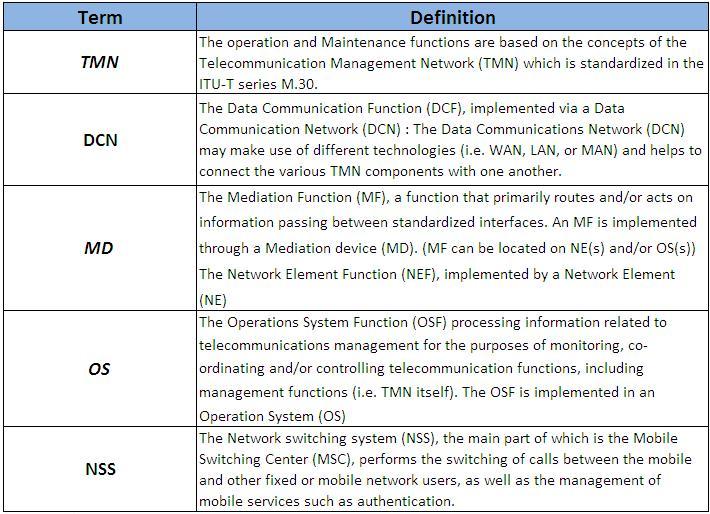
    The Operation and Support System 

The operations and maintenance center (OMC) is connected to all equipment in the switching system and to the BSC. The implementation of OMC is called the operation and support system (OSS). The OSS is the functional entity from which the network operator monitors and controls the system. The purpose of OSS is to offer the customer cost-effective support for centralized, regional, and local operational and maintenance activities that are required for a GSM network. An important function of OSS is to provide a network overview and support the maintenance activities of different operation and maintenance organizations.


GSM Operation and Support System (OSS)
OSS: The operations and maintenance center (OMC) is connected to all equipment in the switching system and to the BSC. The implementation of OMC is called the operation and support system (OSS).
       Here are some of the OMC functions:
       * Administration and commercial operation (subscription, end terminals, charging and statistics).
       * Security Management.
       * Network configuration, Operation and Performance Management.

       * Maintenance Tasks.    

GSM Architecture and Definitions


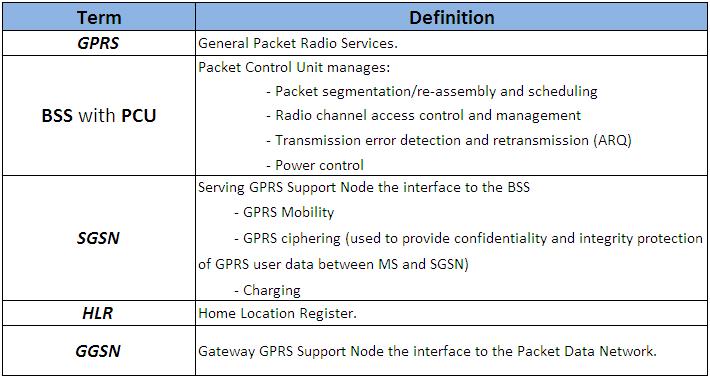
GPRS (General Packet Radio Services
GPRS (General Packet Radio Services)

    
GPRS General Packet Radio Services

GPRS is a data network that overlays a second-generation GSM network. This data overlay network provides packet data transport at rates from 9.6 to 171 kbps. Additionally, multiple users can share the same air-interface resources simultaneously.

GPRS attempts to reuse the existing GSM network elements as much as possible, but to effectively build a packet-based mobile cellular network, some new network elements, interfaces, and protocols for handling packet traffic are required.


GSM Architecture and Definitions


External Networks
  PSTN: Public Switched Telephone Network
  ISDN: Integrated Services Digital Network
  PDN: Packet Data Network

Refferance:
   * Alcatel-Lucent
   * Private Line
   * Tutorials Point 
  * SS7 Training


" GSM Architecture and Definitions (3) " !

GSM Architecture and Definitions (2)


    The Network Switching System  
 

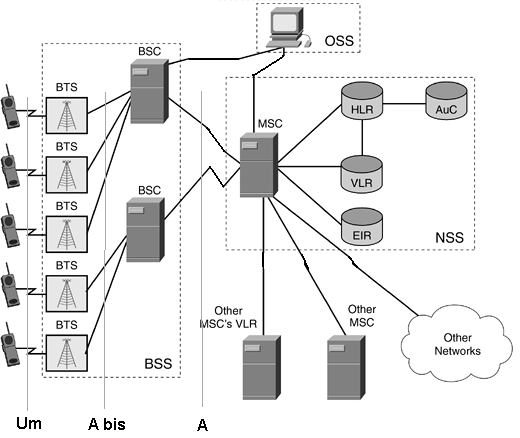
The Network switching system (NSS) is responsible for performing call processing and subscriber-related functions. The switching system includes the following functional units.


GSM Architecture and Definitions
MSC: Mobile Switching Center a switching exchange whose main functions are:
       – Call Handling
       – Specific GSM functions such as:
         • Mobility Management: Communication with the Location Databases (VLR
           and HLR)
         • Handover execution when involved
       – Gateway Function for Terminating Call (TC)
    VLR: Visitor Location Register is associated with one or more MSC. It is a local database with the following
         information:
         – Copy of the HLR data for visiting subscribers
         – More precise location of the Mobile Station (an area of the network called
           “Location Area” which is a group of cells

         – Call re-direction data


GSM Architecture and Definitions

                                                                                                                                                      Next  

Refferance:    
                   * Alcatel-Lucent    
                   * Private Line    
                   * Tutorials Point    
                   * SS7 Training


" GSM Architecture and Definitions (2) " !

GSM Architecture and Definitions (1)


    What is GSM?           

GSM, which stands for Global System for Mobile communications, reigns as the world’s most widely used cell phone technology. Cell phones use a cell phone service carrier’s GSM network by searching for cell phone towers in the nearby area.

The origins of GSM can be traced back to 1982 when the Groupe Spécial Mobile (GSM) was created by the European Conference of Postal and Telecommunications Administrations (CEPT) for the purpose of designing a pan-European mobile technology.


It is approximated that 80 percent of the world uses GSM
GSM Architecture and Definitions
technology when placing wireless calls, according to the GSM
Association (GSMA), which represents the interests of the worldwide mobile communications industry. This amounts to nearly 3 billion global people.

    GSM Network Structure   

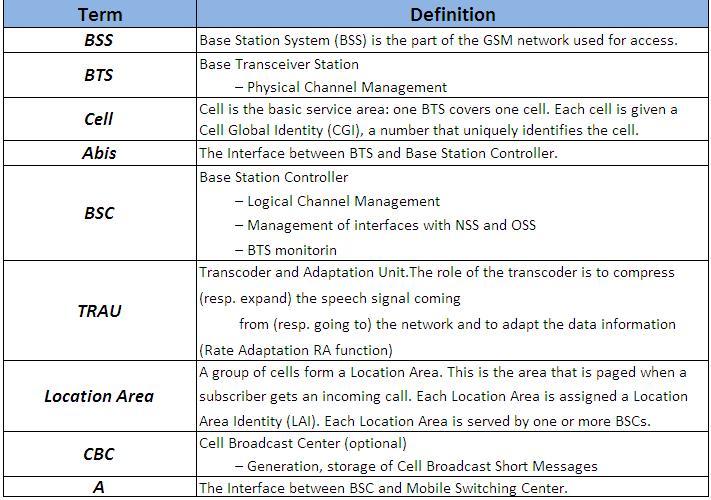
The network is structured into a number of discrete sections:

   *  The Base Station Subsystem (the base stations and their controllers).
   *  The Network and Switching Subsystem (the part of the network most similar to a fixed network). This is sometimes also just called the core network.
   * The GPRS Core Network (the optional part which allows packet based Internet connections).
   *  The Operations support system (OSS) for maintenance of the network.
 

Now,We will explain the meaning of the GSM Network shortcuts.

PLMN: Public Land Mobile Network is area covered by one network operator. A PLMN can contain one or more MSCs.
GSM: Global System for Mobile communication
  MS: Mobile Station is used by the subscriber for calling another subscriber either in the fixed network or in the mobile network.A Mobile Station (MS) is composed of a Mobile Termination (MT) and a Subscriber Module Identity (SIM) card.
   MT: Mobile Termination.The MT performs the following functions:
       - radio transmission termination;
       - radio transmission channel management;
       - terminal capabilities, including presentation of a  man-machine interface to a user;
       - speech encoding/decoding;
       - error protection for all information sent across the radio path;
       - flow control of signalling and user data;
       - rate adaptation of user data between the radio channel rate and user rates;
       - multiple terminal support;
       - mobility management.

SIM: SIM card stores information concerning the subscriber such as subscriber identity,services subscribed, parameters for security procedures and information on the location of the subscriber (dynamically refreshed according to its movements).
  Um > The Radio Interface between MS and Base Station.
     UpLink: The Path of the Data from MS to Base Station.
     DownLink: The Path of the Data from Base Station to MS.


GSM Architecture and Definitions


GSM Architecture and Definitions

                                                                                                   Next
Refferance:
   * Alcatel-Lucent
   * Private Line
   * Tutorials Point 
  * SS7 Training


" GSM Architecture and Definitions (1) " !

Wednesday, October 19, 2011

Optical Fiber Communication


An optical fiber is a flexible, transparent fiber made of very pure glass (silica) not much wider than a human hair that acts as a waveguide, or "light pipe", to transmit light between the two ends of the fiber.The field of applied science and engineering concerned with the design and application of optical fibers is known as fiber optics.

Optical fibers are widely used in fiber-optic communications, which
Optical Fiber Communication
permits transmission over longer distances and at higher bandwidths (data rates) than other forms of communication. Fibers are used instead of metal wires because signals travel along them with less loss and are also immune to electromagnetic interference. Fibers are also used for illumination, and are wrapped in bundles so they can be used to carry images, thus allowing viewing in tight spaces. Specially designed fibers are used for a variety of other applications, including sensors and fiber lasers.

    Optical Fiber Communication       

Optical fiber can be used as a medium for telecommunication and networking because it is flexible and can be bundled as cables. It is especially advantageous for long-distance communications, because light propagates through the fiber with little attenuation compared to electrical cables. This allows long distances to be spanned with few repeaters. Additionally, the per-channel light signals propagating in the fiber have been modulated at rates as high as 111 gigabits per second by NTT,although 10 or 40 Gbit/s is typical in deployed systems.

Each fiber can carry many independent channels, each using a different wavelength of light (wavelength-division multiplexing (WDM)). The net data rate (data rate without overhead bytes) per fiber is the per-channel data rate reduced by the FEC overhead, multiplied by the number of channels (usually up to eighty in commercial dense WDM systems as of 2008[update]).

The current laboratory fiber optic data rate record, held by Bell Labs in Villarceaux, France, is multiplexing 155 channels, each carrying 100 Gbit/s over a 7000 km fiber. Nippon Telegraph and Telephone Corporation have also managed 69.1 Tbit/s over a single 240 km fiber (multiplexing 432 channels, equating to 171 Gbit/s per channel).Bell Labs also broke a 100 Petabit per second kilometer barrier (15.5 Tbit/s over a single 7000 km fiber).

For short distance applications, such as a network in an office building, fiber-optic cabling can save space in cable ducts. This is because a single fiber can carry much more data than electrical cables such as standard category 5 Ethernet cabling, which typically runs at 1 Gbit/s. Fiber is also immune to electrical interference; there is no cross-talk between signals in different cables, and no pickup of environmental noise.

Non-armored fiber cables do not conduct electricity, which makes fiber a good solution for protecting communications equipment in high voltage environments, such as power generation facilities, or metal communication structures prone to lightning strikes. They can also be used in environments where explosive fumes are present, without danger of ignition. Wiretapping (in this case, fiber tapping) is more difficult compared to electrical connections, and there are concentric dual core fibers that are said to be tap-proof.

    Real Project                                         


   References:
                    * Wikipedia  
                    * Youtube (Make Magazine Channel) 

" Optical Fiber Communication " !

Sunday, September 25, 2011

Which Screen Protector should i use?

Best Screen Protector
Screen Protector

A screen protector is used to protect the LCD screens of digital, electronic devices. The personal digital assistant (PDA) is, perhaps, the most commonly used gadget for which screen protectors are used since PDAs are operated via a stylus. If not used carefully, the tip of the stylus can potentially mar or scratch the sensitive LCD screen surface, and so screen protectors were brought to market.


The "first generation" of screen protectors were made from very thin films based on the concept that an extra layer between the two surfaces (screen and stylus) would provide the needed protection to prolong the life of the device. These screen protectors came (and still come) in packs of 10 to 20 protectors and are hand-cut by the end consumer to fit the specific device. Such screen protectors, while offering extra protection, did not completely fill the need in the marketplace. They peeled up easily and they scratched almost as easily as the screens, causing the protector to be replaced often.

The newest generation of screen protectors are made from a much more durable film and are designed to be a more permanent part of the gadget which they protect. The material is a urethane-based film which is a little thicker than traditional screen protectors (.008 inches compared to .005 or .003),[citation needed] but the film is hardly noticeable once installed. The film originated when the U.S. military was looking for a way to protect the leading edges of their military helicopter blades from abrasive airborne particles (sand) while traveling at hundreds of miles per hour. The negative is that it is hard to remove and leaves a sticky residue. It is also made in small sizes, not recommended for bigger than four inch diagonal screens. Since the film is clear, there are problems with UV rays emanating from the display to the eyes and bounce back from the sun. It also does not provide protection from glare and hard to read outdoors.

And for the usage of the cell phone screen, there are mainly 7 kinds of screen protector:

    Privacy Screen Protector                          
   As its name suggests, it is used to give users protection while they use their gadgets. When viewed from a particular angle, the privacy protector darkens your screen. It is also able to offer scratch protection if your device is touchscreen. It is the thickest screen protector available which is why it is considered to be the best type to give you protection and to keep your gadget from getting scratched. Privacy screen protectors comes in pair and can be quite expensive but if you are intent on using these, it will be worth buying.
 
     Mirror Screen Protector                              
   Mirror Screen Protector is a mirror that prevents your LCD screen from getting scratched. Mirror Screen Protector looks and works like a mirror when your phone's screen is shut off (locked). Once the screen is activated, screen contents appear like normal. Mirror Screen Protector measures 85 x 70 mm (3.35 x 2.76 in.) - cut to fit your screen. One sheet can cover more than one screen depending on size of your screens. Mirror Screen Protector does not interfere with stylus or touch screen operation. Easy to apply with no bubbles and easily removable without leaving residue.

     Matte Screen Protector                      
        ViewGuard Anti-Glare Matte Screen Protectors are composed of multiple layers of material, each of which helps to either reduce reflected light or provide additional impact protection for your screen. The anti-scratch coating layer protects your screen from fingerprints, smudges, and scratches. This layer also helps make the ViewGuard screen protector ideal for use with touch-screen tablet PCs and Ultra-Mobile PCs (UMPC). Honestly, who wants to clean fingerprints off a glossy screen all the time?
   One of the best features of the ViewGuard Anti-Glare Matte Screen Protectors is the easy on/off application. The protector is easily attached and removed time and time again without damage to your screen. The screen protector attaches directly to the surface of your display with a silicone adhesive. Since the entire multi-layer film is less than one millimeter thick it can stay attached to your screen and still allow your laptop lid to close.
 
     Ultra-Clear Screen Protector                                               
      More or less,the screen protector will reduce the clearance of the screen. In order to get the best visual effect, the ultra-clear screen protector come out. And high transparency up to 95%.
 Features:
   1. Anti-scratch,anti-grease and dust and stain-proof.
   2. No-glue , static electricity self-adhesive.
   3. No bubble,washable and reusable.
   4. Long lasting protection and firmly on screen
   5. Leave with no residue and would not corrode the surface.
   6. Easy installation .Stability adhesion performance, excellent      high  or low temperature resistance
   7. Standard packing:Color card package,PE bag,cleaning cloth,soft card. Customer package available
 
     Grid Screen Protector                            
      If the use need the screen protector looks threads,the grid screen protetor is good choose.
  Features:
   1. Anti-scratch,anti-grease and dust and stain-proof.
   2. No-glue , static electricity self-adhesive.
   3. No bubble,washable and reusable.
   4. Long lasting protection and firmly on screen
   5. Leave with no residue and would not corrode the surface.
   6. Easy installation .Stability adhesion performance, excellent high or low temperature resistance
   7. Standard packing:Color card package,PE bag,cleaning cloth,soft card. Customer package available
 
     Diamond Screen Protector                                        
         this kind of screen protector can show colorfull shine
  Features:
   1. Anti-scratch,anti-grease and dust and stain-proof.
   2. No-glue , static electricity self-adhesive.
   3. No bubble,washable and reusable.
   4. Long lasting protection and firmly on screen
   5. Leave with no residue and would not corrode the surface.
   6. Easy installation .Stability adhesion performance, excellent high or low temperature resistance
   7. Standard packing:Color card package,PE bag,cleaning cloth,soft card. Customer package available
 
     3D Screen Protector                                             
     The HTC Evo 3D Screen Protector -As an example- is the clear choice for maximum scratch protection. The HTC Evo 3D Screen Protector goes beyond your traditional HTC Evo 3D screen protectors, skins, covers, and cases. TechSkin is made from the same film material used to protect luxury cars, military aircrafts, and NASA space shuttles. The HTC Evo 3D Screen Protector is custom made to specifically fit the HTC Evo 3D .
   Features:
    * • Toughest clear protective film in the market
    * • Clear protection that is virtually invisible
    * • Preserves your HTC Evo 3D 's original design
    * • Protects your HTC Evo 3D from scratches, dents, and physical wear-and-tear
    * • Patented layer of UV protection for anti-yellowing
    * • Provides protection without affecting the functions of your HTC Evo 3D
    * • Non-sticky or restrictive outer surface


" Which Screen Protector should i use? " !

Friday, September 16, 2011

All About iPhone 4

iphone 4
iPhone 4

While everyone else was busy trying to keep up with iPhone, we were busy creating amazing new features that make iPhone more powerful, easier to use, and more indispensable than ever. The result is iPhone 4. The biggest thing to happen to iPhone since iPhone.

Facetime
People have been dreaming about video calling for decades. iPhone 4 makes it a reality. With just a tap, you can wave hello to your kids, share a smile from across the globe, or watch your best friend laugh at your stories — iPhone 4 to iPhone 4 or to the new iPod touch over Wi-Fi. And it works right out of the box. No other phone makes staying in touch this much fun.

Two cameras,two views.
iPhone 4 has two cameras: One on the front, which focuses on you. And one on the back, which focuses on everything else. FaceTime lets you switch back and forth between them at any time during a video call. All you have to do is tap a button.

Retina Display
The Retina display on iPhone 4 is the sharpest, most vibrant, highest-resolution phone screen ever, with four times the pixel count of previous iPhone models. In fact, the pixel density is so high that the human eye is unable to distinguish individual pixels. Which makes text amazingly crisp and images stunningly sharp.

Multitasking
iPhone 4 introduces a whole new way of multitasking. Now you can run your favorite third-party apps — and switch between them instantly — without slowing down the performance of the foreground app or draining the battery unnecessarily.1 This smarter approach to multitasking is available only in iOS 4.

HD Video Recording and Editing
Shoot your own movies in high definition. Capture impressive video even in low-light settings, thanks to the advanced backside illumination sensor and built-in LED light. Then edit and create your own mini-masterpiece right on iPhone 4 using the iMovie app — with Apple-designed themes, titles, and transitions. It’s available on the App Store for $4.99.

5-Megapixel Camera with LED Flash
Take beautiful, detailed photos using the 5-megapixel camera with built-in LED flash. The advanced backside illumination sensor captures great pictures even in low light. And the front-facing camera makes it easy to take self-portraits.


Reference: Apple
                 YouTube

" All About iPhone 4 " !

Wednesday, September 14, 2011

Luxury retailer introduces solid gold phone with a $60,000 price tag

Gold Phone
Gold Phone

Feature-rich smartphones aren't cheap, and critics of pricey mobile devices often claim that they are too expensive, despite their wide-ranging capabilities. Those people will want to look away now, as the newest device from Danish luxury retailer Aesir is sure to make their blood boil. Introducing the limited edition AE+Y phone — an 18-carat solid gold handset that can't use apps, email, or mobile internet, but still carries a ridiculous price of 42,000 euros (roughly $60,000).
The lavish device boasts groundbreaking features such as speed dial, call forwarding, and even a built-in calculator.


Its LCD screen measures a modest 2", and its battery can handle a measly 5 hours of talk time — compared to the Droid Bionic's 11-hour, and iPhone 4's 14-hour limits. But Aesir is focusing more on form than function, and the manufacturer is quick to point out that the edge-to-edge key design is a first in mobile handsets.

The AE+Y's barebones user interface was shaped by renowned designer Tom Hingston, and the phone's unorthodox keypad is laser-engraved and features "advanced LED backlighting." We're not quite sure how that varies from regular LED backlighting, but I guess we have to take Aesir's word on that.

Aesir's target market is clearly the super rich, but do the wealthy not also desire useful gadgets? Then again, if you're affluent enough to drop $60,000 on a solid gold phone, you're probably too busy playing polo and ordering around your servants to care about apps or email anyway.

For those of you who are only rich — as opposed to super rich — Aesir is also making a stainless steel version which will retail for a slightly less mind boggling $10,000. Both devices will debut this fall in Europe, and shortly thereafter in the U.S.
 

Source: Yahoo 

" Luxury retailer introduces solid gold phone with a $60,000 price tag " !

Tuesday, August 30, 2011

All about ipad 2


There‘s more to it. And even less of it. 
Two cameras for FaceTime and HD video recording. The dual-core A5 chip. The same 10-hour battery life.1 All in a thinner, lighter design. Now iPad is even more amazing. And even less like anything else.
 
Thinner, lighter, and
full of great ideas.

Once you pick up iPad 2, it’ll be hard to put down.
That’s the idea behind the all-new design. It’s 33 percent thinner and up to 15 percent lighter, so it feels even more comfortable in your hands.2 And it makes surfing the web, checking email, watching movies, and reading books so natural, you might forget there’s incredible technology under your fingers.

Dual-core A5 chip.It’s fast, times two.
Two powerful cores in one A5 chip mean iPad can do twice the work at once. You’ll notice the difference when you’re surfing the web, watching movies, making FaceTime video calls, gaming, and going from app to app to app. Multitasking is smoother, apps load faster, and everything just works better.

Superfast graphics.Go, gamers, go.
With up to nine times the graphics performance, gameplay on iPad is even smoother and more realistic. And faster graphics help apps perform better — especially those with video. You’ll see it when you’re scrolling through your photo library, editing video with iMovie, and viewing animations in Keynote.


Battery life keeps on going. So you can, too.
Even with the new thinner and lighter design, iPad has the same amazing 10-hour battery life.1 That’s enough juice for one flight across the ocean, or one movie-watching all-nighter, or a week’s commute across town. The power-efficient A5 chip and iOS keep battery life from fading away, so you can get carried away.

Two cameras. And a big hello to FaceTime for iPad.
You’ll see two cameras on iPad — one on the front and one on the back. They may be tiny, but they’re a big deal. They’re designed for FaceTime video calling, and they work together so you can talk to your favorite people and see them smile and laugh back at you.3 The front camera puts you and your friend face-to-face. Switch to the back camera during your video call to share where you are, who you’re with, or what’s going on around you. When you’re not using FaceTime, let the back camera roll if you see something movie-worthy. It’s HD, so whatever you shoot is a mini-masterpiece. And you can take wacky snapshots in Photo Booth. It’s the most fun a face can have.

iPad Smart Cover. Designed for iPad. And vice versa.
 

LED-backlit display.The view is amazing.

Multi-Touch.Everything’s at your fingertips.

iOS 4.The world’s most advanced mobile operating system.

Wi-Fi and 3G.Two great ways to stay connected.
 

Gyro, accelerometer, and compass.
iPad knows your every move.
 

AirPlay.Your movie-photo-music stream.

Video mirroring.What you do is what they see.
 

AirPrint. Print everything wirelessly.


" All about ipad 2 " !